Accessibility can be a daunting subject, but here at Commonplace we've got you covered with full compliance to WCAG 2.2 AA on all live Commonplace projects.
This compliance covers most interactions a user may have with the site - such as making sure that it is possible to navigate every page only using a keyboard.
However, it is still important to take care to ensure that your content is up to scratch to ensure a smooth experience for people using assistive technologies such as screen-readers.


Below is a list of things to consider to improve the visitor and respondent experience and engagement levels on your Commonplace:
Include clear instructions on how people should navigate the site - for example, add a 'call to action' button to your hero banner, and make sure to hyperlink your surveys in a dedicated Project Overview tile and in all news updates.
If your text references another location on the project, be sure to link to it - e.g. ‘You can find more information in our Documents Library’.
Avoid using jargon. If you really have to, make sure to explain technical terms in a way that is easy to understand.
Organise your content in a clear, structured way with titles and headings.
Summarise your content using bullet points. Avoid uploading large PDFs or documents. Be clear and concise, bearing in mind most people will share their comments via their phones. Use the mobile screen preview in edit mode to gauge how much content is enough (or too much!).
Give your hyperlinks unique and descriptive names. Instead of ‘Have your say here’, write ‘Have your say by filling in our Kettering active travel survey’.
In the branding section of your project dashboard, use colours carefully - for example, avoid using light coloured text on a light coloured background. You can use tools such as https://webaim.org/resources/contrastchecker/ to check if your contrast levels are sufficient.
Don’t add images with text in them as they will not be accessible to screen-readers. Instead, write the content out and add the image below to illustrate your point.
Always add alt text to your images.
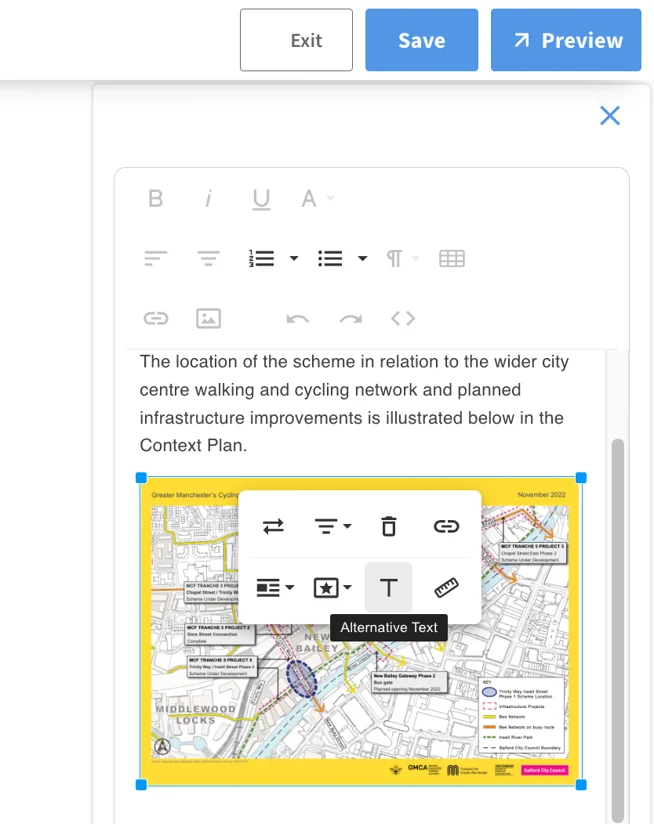
The alt text will be read out by the screen-reader, so make sure you are being descriptive e.g. ‘A busy street with many pedestrians and cyclists’ instead of ‘Mare Street’.
Think about offline face-to-face engagement for interview style surveys, either via Survey Mode or paper surveys. Please talk to your Customer Success Manager about the paper surveys and how to best go about it.
If you have any further questions about accessibility, please don’t hesitate to reach out to your Customer Success Manager - they'll be happy to offer further information and guidance.
You can further widen your reach and maximise diversity and inclusion by considering translating your content into the languages spoken locally - further information about translation can be found here.
Still unsure about anything? There's lots more information here on the Commonplace Help Centre - alternatively, contact the support team and we'll be happy to help 👋
