The community heatmap is a great tool to gather feedback on how people feel about a specific area. Typically they deliver much higher engagement rates than standard page-based surveys, due to their visual appeal and more interactive nature.
This article focuses primarily on scenarios where you might choose to use a map and best practices for designing questions. To learn more about how to create and configure maps, see Introduction to maps / how to create and edit a map tile.
On the community heatmap, users drop a pin in a specific location and then answer a series of questions about that location. Their answers are then displayed on a map for everyone to view, allowing you to build up a picture of local sentiment.
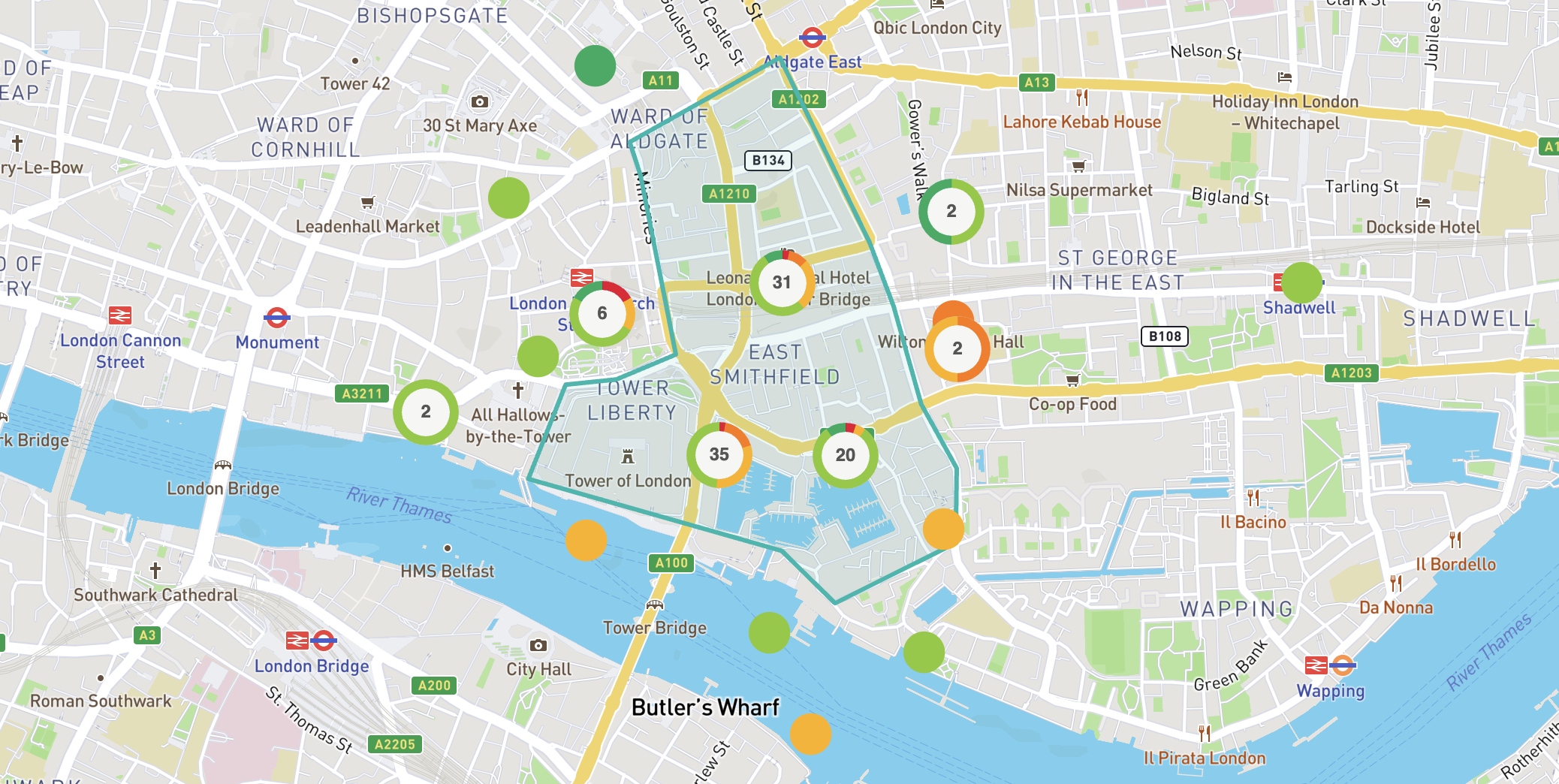
Community heatmaps can include other layers, too - such as a boundary to indicate the focus area of your project. There are also a number of more advanced layer types and features - such as using custom icons for pins. More information about these features can be found here.
The community heatmap works best when you need respondents to identify the location of something for you - for example, asking respondents to pinpoint locations where they feel unsafe.
Conversely, if you're seeking feedback about something with a fixed location (such as a new crossing point), the community heatmap may not be the best tool for this application.
Some possible use cases for the community heatmap are:
Understanding local issues (e.g. where extra lighting is needed)
Gathering evidence for a local plan
Collecting ideas for a regeneration project
Consulting on a new traffic layout
Understanding where people feel unsafe
Seeking feedback on a masterplan
Reporting of issues (e.g. potholes)
These are just a few of the possible use cases - the possibilities are virtually endless! If you have an idea for a possible community heatmap usage, your Customer Success Manager will advise you on the best way to configure it to get the community feedback you're after.
The webinar below takes a deeper dive into the community heatmap tool and how it can be used.
Map webinar
Exploring the Commonplace map: engagement data in context
The first thing to remember is that respondents will be commenting about one specific location. Therefore, the questions should be focused on the specific location they have pinned - whilst also being general enough that they could be applicable to any possible location a respondent might pin.
A typical community heatmap survey might look something like this:
Describe the location you're commenting on in more detail (free text)
This question allows a respondent to specify whether their pins refers to the street as a whole, a specific junction, etc.
How do you feel about this place? (smiley face scale)
This question allows a respondent to give a general indication of how they feel about a place. The sentiment they select here usually controls the colour of the pins that appear on the map.
Why do you feel this way? (multiple choice)
These are often designed in pairs - e.g. feels safe / feels unsafe, well lit / poorly lit, vibrant / dull.
How could it be improved? (free text or multiple choice)
This question could be asked in several ways - a free text question is more open, while a multiple choice question allows you to frame the conversation more. Example options could include better lighting, places to sit, planting and greenery, etc.
Do you have any other comments?
This question provides a final option for people to share any other comments they might have about a place
More information about the different survey question types can be found here.
Introduction to maps / how to create and edit a map tile
Still unsure about anything? There's lots more information here on the Commonplace Help Centre - alternatively, contact the support team and we'll be happy to help 👋
